You can ask your coding agent for a selector to compare UI options
June 25, 2026One of the ways I have been using coding agents these days is to prototype small UI changes in an existing project. I use them as a tool to explore.
In this usage mode, I am not interested in the code. I am interested in how the options look. My objective is to extract ideas from the LLM, choose what I want, and later work on the real change in a different chat.
Ask for a selector to compare
One little trick I discovered recently is that you can simply ask for a selector to compare the options.
The coding agent can implement several UI alternatives and add a small selector that lets you switch between them in the real application.
You can literally ask for it. This is a translation of a prompt I used recently (I wrote it in Spanish):
How can we subtly improve the links in the menu? Maybe use a more neutral color and a different hover state.
It is important not to change the spacing between links, and the result must work with any account color configuration.
Implement three options and add a selector so I can switch between them and compare them.
The agent added a selector fixed to the bottom of the app. As the conversation continued, it grew from three options to five:
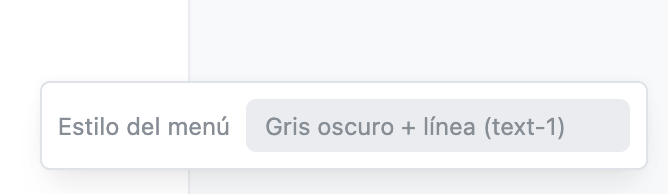
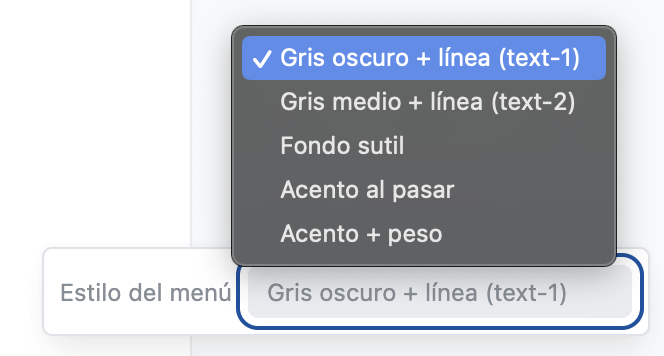
I could see every option in context, ask questions about the differences, and add another variation without having to imagine the result from a description.
In the end I chose Gray + underline. Then I asked the agent to keep that option and remove all the other code.
An example for you
You can try the same thing in your app right now. Pick a small UI decision that you have not resolved and ask something like:
Create three visual options for [this element] and add a temporary selector so I can switch between them and compare them in the app.
Maybe you can also describe the constraints that matter to you: do not change spacing, support every theme color, apply the option in desktop and mobile, or show the selector only to staff users.
The selector does not need to be polished. It only needs to make the decision easier.
A disposable thing
For now, I do not think you need a special tool for this. I ask the coding agent to build the comparison UI and then remove it after I decide.
Where I have tried this
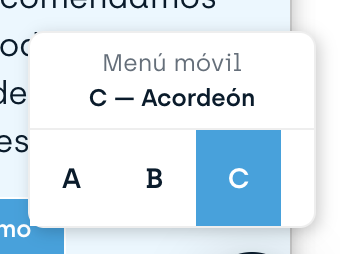
I have tried this with Codex using GPT-5.5 and with Cursor using Composer 2.5, in two different projects. They built different widgets, but both worked.
This is a widget from the other project:
Appendix: one version of the generated code
As I said before, I think this kind of tool should be disposable. But this is part of the code produced for one iteration. Maybe it can help you.
The selector was just regular HTML:
<label class="menu-style-picker">
  <span>Menu style</span>
  <select
    data-menu-style-target="select"
    data-action="menu-style#change"
  >
    <option value="gray-dark-underline">Gray dark + underline</option>
    <option value="gray-mid-underline">Gray medium + underline</option>
    <option value="quiet-fill">Quiet fill</option>
    <option value="accent-reveal">Accent on hover</option>
    <option value="accent-weight">Accent + weight</option>
  </select>
</label>
A small Stimulus controller changed a data attribute and remembered the selection:
import { Controller } from "@hotwired/stimulus"

const storageKey = "menu-style"
const defaultStyle = "gray-dark-underline"

export default class extends Controller {
  static targets = ["select"]

  connect() {
    this.apply(localStorage.getItem(storageKey) || defaultStyle)
  }

  change() {
    this.apply(this.selectTarget.value)
    localStorage.setItem(storageKey, this.selectTarget.value)
  }

  apply(style) {
    this.element.dataset.menuStyle = style
    this.selectTarget.value = style
  }
}
And each option was scoped by the data attribute:
.menu[data-menu-style="gray-dark-underline"]
  :is(.menu-navbar-nav, .menu-nav) > a:not(.btn) {
  color: var(--text-1);

  &:hover {
    color: var(--main-color);
    text-decoration-color: currentColor;
  }
}

.menu[data-menu-style="quiet-fill"]
  :is(.menu-navbar-nav, .menu-nav) > a:not(.btn) {
  color: color-mix(in srgb, var(--main-color) 28%, var(--text-1));
  text-decoration: none;

  &:hover {
    color: var(--main-color);
    background-color: color-mix(in srgb, var(--main-color) 9%, white);
  }
}
Nothing here needed to survive after I chose an option.
Related articles
Subscribe to get future posts via email
Here I try to share knowledge and fixes to common problems and struggles for ruby on rails developers, like How to fetch the latest-N-of-each record or How to test that an specific mail was sent or a Capybara cheatsheet. You can see more examples on Most recent posts or all posts.